Page189
Promiscuous Network Access
Accessing all unicast traffic on a network segment requires “promiscuous” network access. Systems such as Network Intrusion Detection Systems (NIDS) require promiscuous network access in order to monitor all traffic on a network. Network nodes normally only “see” unicast traffic sent directly to them. Accessing unicast traffic sent to other nodes requires two things: a network interface card (NIC) configured in promiscuous mode and the ability to access other unicast traffic on a network segment.
Placing a NIC in promiscuous mode normally requires super-user access, such as the root user on a UNIX system. Devices such as switches provide traffic isolation, so that each host will only receive unicast traffic sent to it (in addition to broadcast and multicast traffic). As we will see in a later section, a hub, switch SPAN port, or TAP is typically used to provide promiscuous network access.
TCP
TCP is the Transmission Control Protocol, a reliable Layer 4 protocol. TCP uses a three-way handshake to create reliable connections across a network. TCP can reorder segments that arrive out of order, and retransmit missing segments.
Key TCP Header Fields
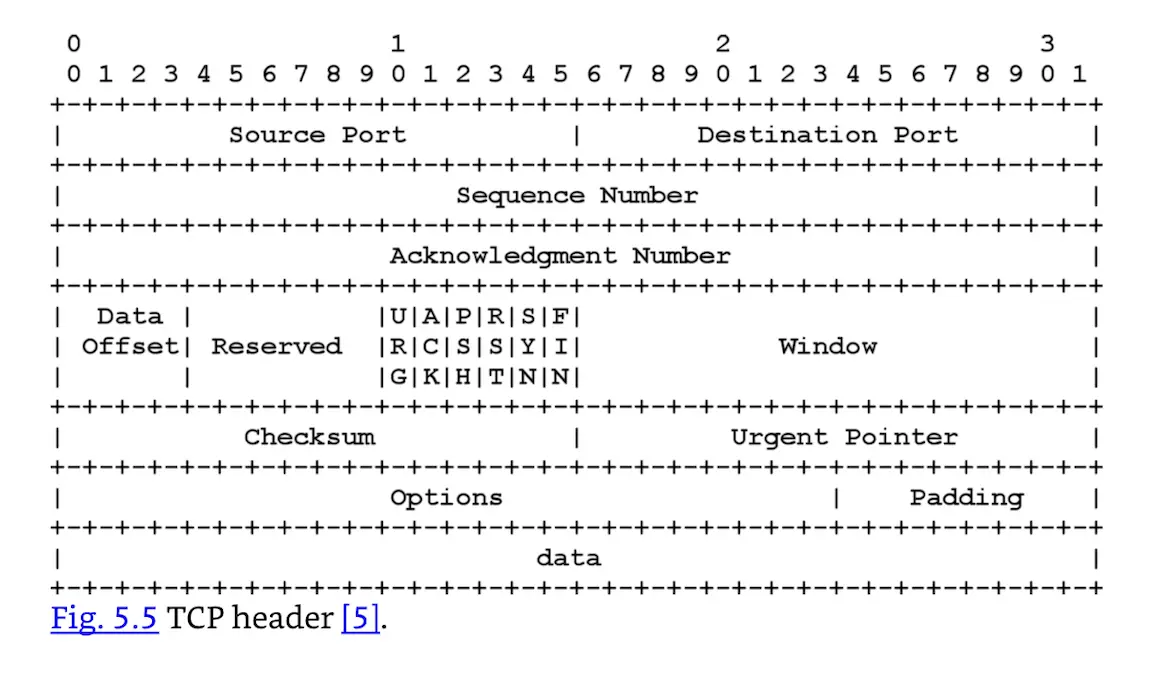
A TCP header, shown in Fig. 5.5, is 20 bytes long (with no options), and contains a number of fields. Important fields include:
- Source and Destination port
- Sequence and Acknowledgment Numbers: Keep full-duplex communication in sync
- TCP Flags
- Window Size: Amount of data that may be sent before receiving acknowledgment
TCP Ports
TCP connects from a source port to a destination port, such as from source port 51178 to destination port 22. The TCP port field is 16 bits, allowing port numbers from 0 to 65535.
There are two types of ports: reserved and ephemeral. A reserved port is 1023 or lower; ephemeral ports are 1024–65535. Most operating systems require super-user privileges to open a reserved port. Any user may open an (unused) ephemeral port.
Common services such as HTTP use well-known ports. The Internet Assigned Numbers Authority (IANA) maintains a list of well-known ports at https://www.iana.org/assignments/service-names-port-numbers/service-names-port-numbers.xhtml. Most Linux and UNIX systems have a smaller list of well-known ports in /etc/services.