Page192
ICMP
ICMP is the Internet Control Message Protocol, a helper protocol that helps Layer 3 (IP, see note). ICMP is used to troubleshoot and report error conditions: Without ICMP to help, IP would fail when faced with routing loops, ports, hosts, or networks, etc., that are down. ICMP has no concept of ports, as TCP and UDP do, but instead uses types and codes. Commonly used ICMP types are echo request and echo reply (used for ping) and time to live exceeded in transit (used for traceroute).
Note
“Which protocol runs at which layer” is often a subject of fierce debate. We call this the “bucket game.” For example, which bucket does ICMP go into: Layer 3 or Layer 4? ICMP headers are at Layer 4, just like TCP and UDP, so many will answer “Layer 4.” Others argue ICMP is a Layer 3 protocol, since it assists IP (a Layer 3 protocol), and has no ports.
This shows how arbitrary the bucket game is: a packet capture shows the ICMP header at Layer 4, so many network engineers will want to answer “Layer 4”: never argue with a packet. The same argument exists for many routing protocols: for example, BGP is used to route at Layer 3, but BGP itself is carried by TCP (and IP). This book will cite clear-cut bucket game protocol/layers in the text and self-tests, but avoid murkier examples (just as the exam should).
Ping
Ping (named after sonar used to “ping” submarines) sends an ICMP Echo Request to a node and listens for an ICMP Echo Reply. Ping was designed to determine whether a node is up or down.
Ping was a reliable indicator of a node’s status on the ARPAnet or older Internet, when firewalls were uncommon (or did not exist). Today, an ICMP Echo Reply is a fairly reliable indicator that a node is up. Attackers use ICMP to map target networks, so many sites filter types of ICMP such as Echo Request and Echo Reply.
An unanswered ping (an ICMP Echo Request with no Echo Reply) does not mean a host is down. The node may be down, or the node may be up and the Echo Request or Echo Reply may have been filtered at some point.
Traceroute
The traceroute command uses ICMP Time Exceeded messages to trace a network route. As discussed during IP, the Time to Live field is used to avoid routing loops: every time a packet passes through a router, the router decrements the TTL field. If the TTL reaches zero, the router drops the packet and sends an ICMP Time Exceeded message to the original sender.
Traceroute takes advantage of this TTL feature in a clever way. Assume a client is four hops away from a server: the client’s traceroute client sends a packet to the server with a TTL of 1. The router A decrements the TTL to 0, drops the packet, and sends an ICMP Time Exceeded message to the client. Router A is now identified.
The client then sends a packet with a TTL of 2 to the server. Router A decrements the TTL to 1 and passes the packet to router B. Router B decrements the TTL to 0, drops it, and sends an ICMP Time Exceeded message to the client. Router B is now identified. This process continues until the server is reached, as shown in Fig. 5.10, identifying all routers along the route.
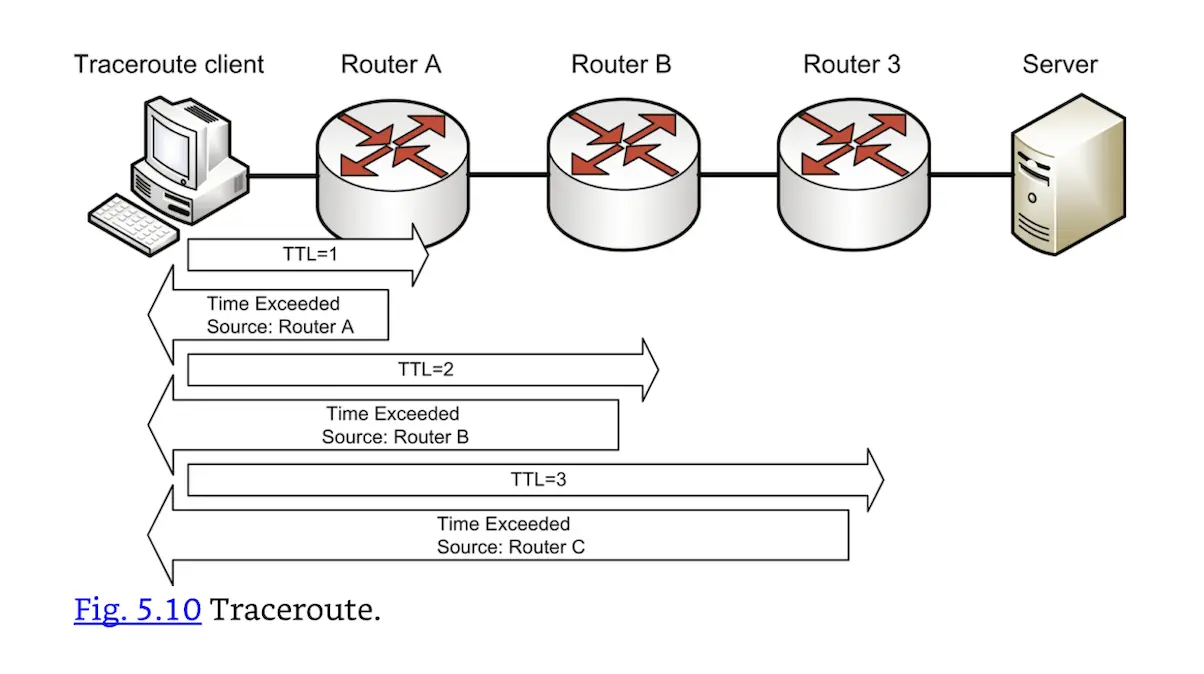 Traceroute.
Most traceroute clients (such as UNIX and Cisco) send UDP packets outbound. The outbound packets will be dropped, so the protocol does not matter. The Windows tracert client sends ICMP packets outbound; Fig. 5.11 shows Windows tracert output for a route to www.syngress.com. Both client types usually send three packets for each hop (the three “ms” columns in the Fig. 5.11 output).
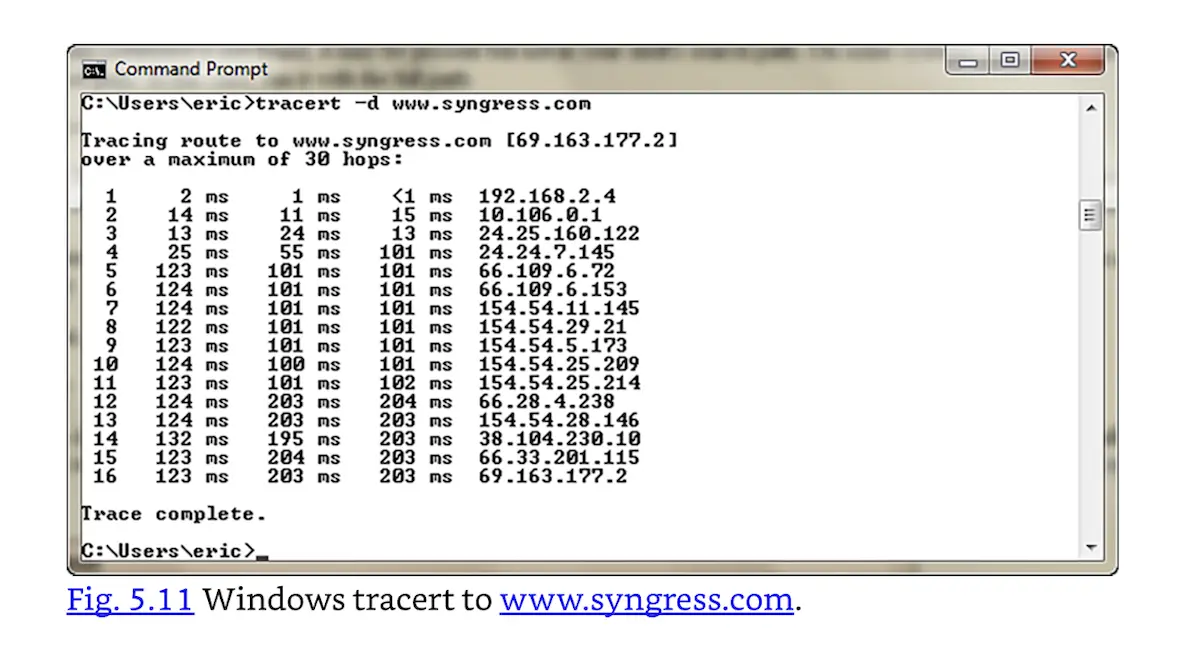 Windows tracert to www.syngress.com.