Page215
Static and Default Routes
For simple routing needs, static routes may suffice. Static routes are fixed routing entries, saying “The route for network 10.0.0.0/8 routes via router 192.168.2.7; the route for network 172.16.0.0/12 routes via router 192.168.2.8,” etc. Most SOHO (Small Office/Home Office) routers have a static “default route” that sends all external traffic to one router (typically controlled by the ISP).
Here is an example of a typical home LAN network configuration:
- Internal network: 192.168.1.0/24
- Internal Firewall IP: 192.168.1.1
- External Network: 192.0.2.0/30
- External Firewall IP: 192.0.2.2
- Next hop address: 192.0.2.1
The firewall has an internal and external interface, with IP addresses of 192.168.1.1 and 192.0.2.2, respectively. Internal (trusted) hosts receive addresses on the 192.168.1.0/24 subnet via DHCP. Internet traffic is NAT-translated to the external firewall IP of 192.0.2.2. The static default route for internal hosts is 192.168.1.1. The default external route is 192.0.2.1. This is a router owned and controlled by the ISP.
Routing Protocols
Static routes work fine for simple networks with limited or no redundancy, like SOHO networks. More complex networks with many routers and multiple possible paths between networks have more complicated routing needs.
The network in Fig. 5.21 has redundant paths between all four sites. Should any single circuit or site go down, at least one alternate path is available. The fastest circuits are the 45-megabit T3s that connect the data center to each office. Additional 1.5-megabit T1s connect Office A to B, and B to C.
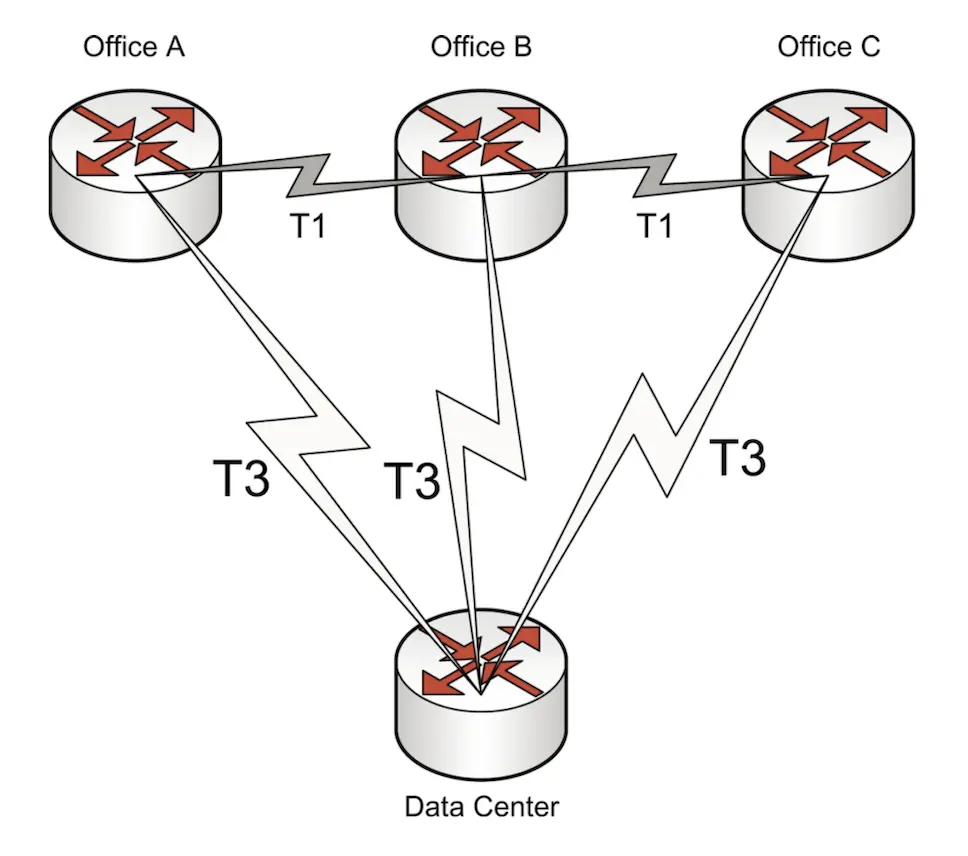 Redundant network architecture.