Page234
Password Guessing
Password guessing is an online technique that involves attempting to authenticate a particular user to the system. As we will learn in the next section, Password cracking refers to an offline technique in which the attacker has gained access to the password hashes or database. Note that most web-based attacks on passwords are of the password-guessing variety, so web applications should be designed with this in mind from a detective and preventive standpoint.
Password guessing may be detected by monitoring the failed login system logs. Clipping levels are used to differentiate between malicious attacks and normal users accidentally mistyping their passwords. Clipping levels define a minimum reporting threshold level. Using the password-guessing example, a clipping level might be established such that the audit system only alerts if failed authentication occurs more frequently than five times in an hour for a particular user. Clipping levels can help to differentiate the attacks from noise; however, they can also cause false negatives if the attackers can glean the threshold beneath which they must operate.
Preventing successful password-guessing attacks is typically done with account lockouts. Account lockouts are used to prevent an attacker from being able to simply guess the correct password by attempting a large number of potential passwords. Some organizations require manual remediation of locked accounts, usually in the form of intervention by the help desk. However, some organizations configure account lockouts to simply have an automatic reset time, which would not necessarily require manual intervention. Care should be taken in the account lockout configuration: an attacker (though unsuccessful at guessing a correct password) might cause significant administrative burden by intentionally locking out a large volume of accounts.
Password Hashes and Password Cracking
In most cases, cleartext passwords are not stored within an IT system; only the hashed outputs of those passwords are stored. Hashing is one-way encryption using an algorithm and no key. When a user attempts to log in, the password they type (sometimes combined with a salt, as we will discuss shortly) is hashed, and that hash is compared against the hash stored on the system. The hash function cannot be reversed: it is impossible to reverse the algorithm and produce a password from a hash. While hashes may not be reversed, an attacker may run the hash algorithm forward many times, selecting various possible passwords, and comparing the output to the desired hash, hoping to find a match (and therefore deriving the original password). This is called password cracking.
Password hashes for modern UNIX/Linux systems are stored in /etc/shadow (which is typically readable only by the root user). Windows systems store hashes both on the local machine and on the domain controller (DC) in what is called the security account management file or SAM file. The password hashes must be accessed in order to authenticate. If a Microsoft Windows system cannot access the DC, then it may revert to the locally stored password hashes stored within the workstation itself. If a user is running a stand-alone system, typical of most home users, then only local password hashes are used.
Password hashes may also be sniffed on networks or read from memory. The SAM file is locked while the Windows operating system is running; tools such as mimikatz (https://github.com/gentilkiwi/mimikatz) and Metasploit’s (https://www.metasploit.com) “hashdump” command can dump the hashes from memory. Fig. 6.1 shows the SAM file output from a Windows workstation via the tool mimikatz (https://github.com/gentilkiwi/mimikatz). Both the LM hash and NT hash for user deckard are shown which could be used as input to a password-cracking tool.
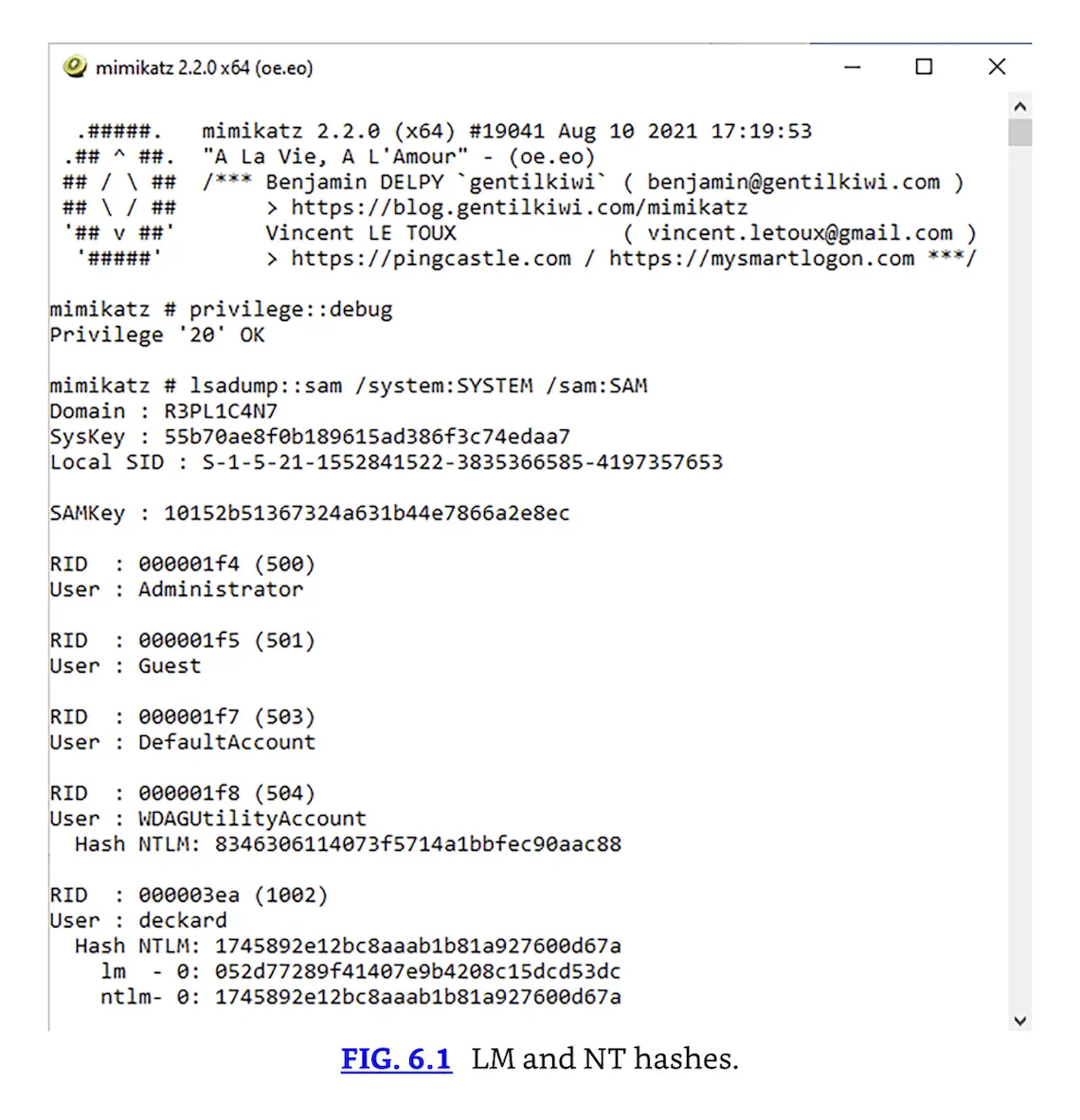 LM and NT hashes.